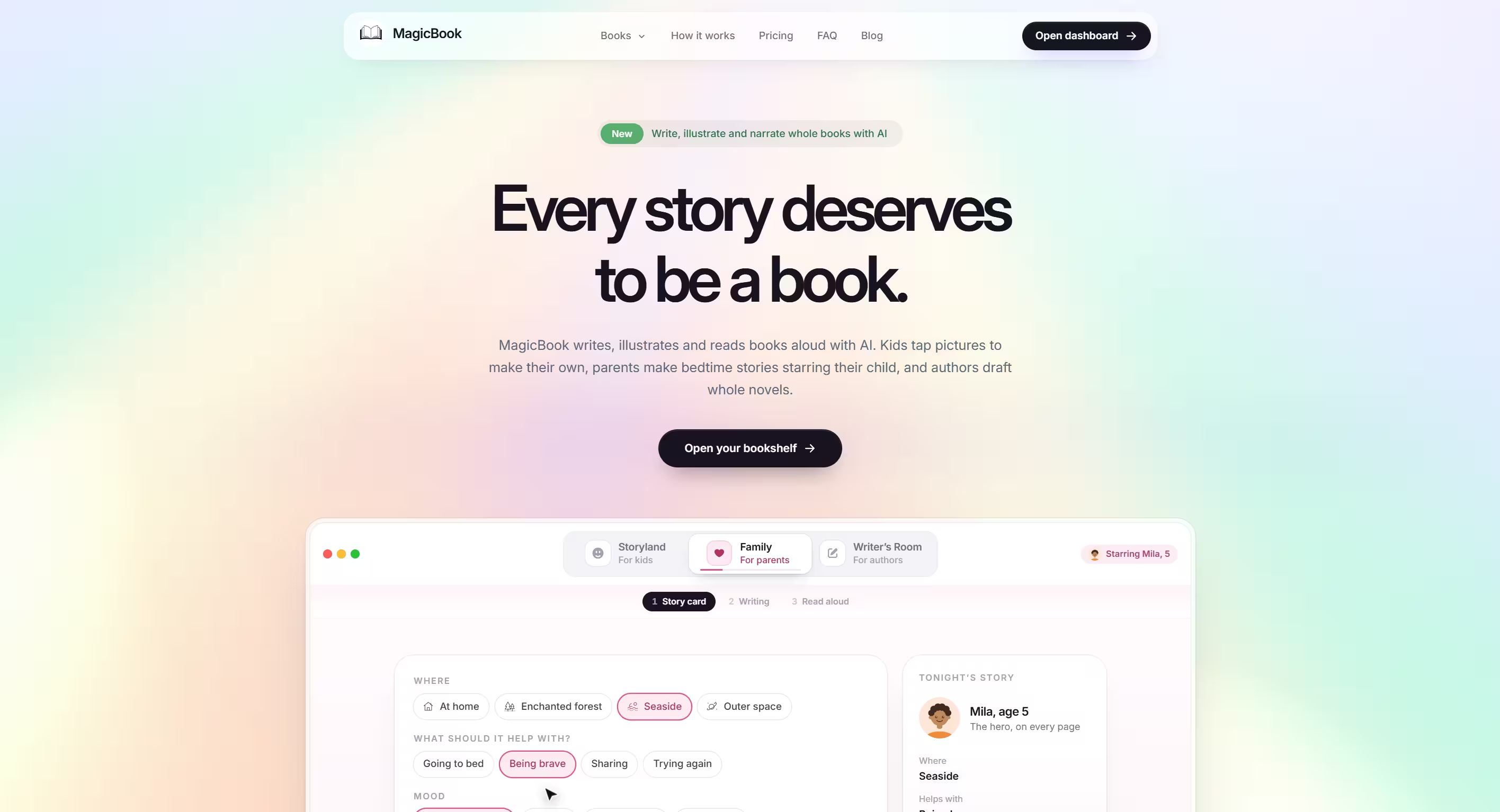
MagicBook is a complete, self-hosted AI book creation platform you can run as your own SaaS. Your customers describe an idea, and MagicBook writes the story, draws every page, reads it aloud and hands back a finished book to read on screen, share by private link or download as a PDF. It has 3 creative modes: Storyland for children who cannot type yet, Family for personalised bedtime stories that star your own child, and the Writer's Room for novels, chapter books and short stories. AI writes the text, draws the pictures with characters that look the same on every page, and narrates the result, and every request is checked for age-appropriate content before anything is shown, so a blocked result is never displayed and never charged.
Everything an operator needs is already in the box: separate accounts with their own shelf, children, media library and credits, credit metering with per-model AI pricing, site-wide book length limits, age-based safety checks, an admin panel that controls the whole site, and a setup wizard that checks server requirements before it writes a thing. Background work runs through the cron scheduler rather than a queue worker, and the core needs no Node process and no video encoder, so it installs on standard shared hosting. The SaaS Business plugin adds plans, checkout and payment gateways when you are ready to charge.
Three modes, one story engine
- Storyland — a picture-book maker for children, with no typing at all. A story takes five taps: a hero (30 to choose from), a friend (15, or "Just me!"), a place (24, and the sky and colours of the page change to match), an adventure (20) and up to three stickers (32). Roll the dice to fill every pick at random. Inkling the owl reads every question and choice aloud, and, when you switch voice input on, children can say their own idea out loud. If a step fails, the child sees a friendly message and nothing is charged.
- Kid mode — lock the app into Storyland and the reader. Only a grown-up with the 4-digit PIN can leave, and five wrong guesses make the PIN pad wait for a minute.
- Family — a recipe card turns a parent's idea into tonight's story. Choose who stars, where it happens, a sidekick (a pet, a toy, a friend), a little lesson, a mood and a reading time, and add one sentence about the day, such as a first lost tooth, for the story to use. The "Tonight's story" panel fills in as you pick, and the card is kept as a draft.
- 20 gentle lessons — in five groups (feelings, every day, kindness, growing up and big changes) such as scared of the dark, saying sorry, a new baby, starting school or losing a pet, or just a story for fun. The lesson is shown through what happens, never preached.
- Children profiles — add a child with a name, an age, an avatar built from hair, skin and clothes swatches, the things they love and the subjects stories should leave out. Each child's card shows which books they star in. Profiles are private to the account.
- Photo likeness (optional) — a parent can upload one photo for a closer likeness. It is used once to draw the character sheet, then deleted, and a clean-up job removes any photo that was never used. You decide whether to offer it at all and which plans get it.
- Writer's Room — a five-stage studio for authors, described below. Formats are picture book, short story, chapter book and novel, up to 100,000 words for a novel by default and up to 300,000 if you raise the ceiling.
The Writer's Room
- Spark — turn an idea, a "what if" question or a photo or child's drawing (PNG, JPG or WebP up to 10 MB) into three premise cards. Lock the lines you like, shuffle the rest, and make one the premise of the book.
- Shape — drop a pin on a genre map to blend genres, move four tone dials (mood, humour, pace and prose), then set format, audience, length and language, and write the back-cover blurb. The blurb tells you when the book has changed and it needs a rewrite.
- Cast & World (the Story Journal) — characters, places, items, world rules, groups and notes on a wall of cards. A character dossier holds wants, needs, fears, secret, looks, voice and change. Facts can be "true from" a chosen point, entries can have aliases, and any entry can be hidden from the AI to keep a secret for later.
- Character sheets, auditions and interviews — draw a reference sheet for each character, hold auditions to get three candidate characters, fill in the blanks of an entry, or interview a character and get the answers in their own voice.
- Catch up from a chapter — the AI reads a chapter and lists the new characters, places and facts it introduced, and you add the ones you want to the journal.
- Plot — choose one of 6 story structures (Three acts, Save the Cat, Hero's journey, Seven points, Kishōtenketsu or Story spine), let the AI plan the chapters or pages, and drag a tension curve into shape. Ask "what if…" on any chapter to rewrite the plan from there onward, with undo.
- Story Room — see the book as chapters of scene tiles, as a corkboard of scene cards with plot threads strung between them, or as a single page. Scenes carry a status (empty, planned, drafting, drafted, needs update or final), and a scene is flagged when its plan changed after it was written.
- Write at any scale — draft one scene, every empty scene in a chapter or the whole book, and stop after the scene being written. Continue where the text stops, write a scene again, or select a passage and rewrite it with your own instruction.
- Check continuity — compare a scene with the Story Journal, and accept or dismiss each suggestion. Nothing changes until you press "Use it".
- Beta readers — simulated readers react to a scene, shown as a heatmap along the text: gripped, moved, laughed, confused, bored or doubtful.
- Your style — MagicBook learns how you write from your own text, so new AI text can follow it.
- Versions and notes — every AI change and a copy of your own writing are kept as versions you can restore, and margin notes can be marked done. Edits save together about a second and a half after you stop typing.
Picture Studio
- Story to pages in one press — describe the story in a sentence, choose who is in it or let the AI invent the cast, and every page is written with its words, a note of what the picture shows and who is in it.
- Characters that stay the same — each character is drawn once as a reference sheet, and every later picture of them is drawn from it.
- Draw, redraw, restore — draw one page, every page or the cover. Earlier pictures are kept, and one click brings a favourite back.
- 10 art styles included — Watercolour, Crayon, Paper cut-out, Clay, Soft 3D, Manga, Vintage golden book, Ink and wash, Pixel art and Coloring line art (black-and-white pages to colour in).
- Add your own styles — a name, a style prompt, an "avoid" list, a children's-book switch and a line-art switch, with a preview drawn by your own image model so customers see what they get.
- Page layout — drag pages into a new order, add or remove pages, and choose where the words sit on the picture. Picture books run to 40 pages by default, and up to 200 if you raise the ceiling.
Reader, narration and sharing
- Full-screen reader — picture books read page by page with their pictures, novels chapter by chapter, with arrow keys or on-screen arrows. The reader remembers where each book was left.
- Narration by ElevenLabs — pick a narrator, hear a sample, then record the whole book chapter by chapter, or only the chapters not yet recorded. Listen along while the text is read, and stop at the end of the current chapter.
- Voices library — search and filter voices by style, language, gender, age and accent, preview each one, hear a voice speak each of its languages, play them in turn and keep a shortlist. Mark voices "For children" and children's books offer only those.
- Inkling's own voice — record Inkling's Storyland lines with one of your voices. Until you do, Inkling uses the browser's voice.
- Private share links — a long random address anyone can open without an account. Stop sharing and the link dies at once, and shared books are never indexed by search engines.
- PDF download — screen-quality PDFs with bundled fonts and a fallback font for languages such as Arabic, Chinese and Hindi.
- 28 book languages — English, Spanish, French, German, Italian, Portuguese, Dutch, Polish, Turkish, Russian, Ukrainian, Arabic, Hebrew, Hindi, Japanese, Korean, Chinese, Swedish, Danish, Norwegian, Finnish, Greek, Czech, Romanian, Hungarian, Indonesian, Vietnamese and Thai.
Library and account
- Bookshelf — three doors start a book, counters show books, words and finished books, and the shelf switches between a covers view and a shelf view with a spine for each book. Search, mode filter and sorting (recently opened, title, furthest along, newest) all run in the browser, so the list changes the moment you tap.
- Book menu — read, open, download a PDF, duplicate or remove a book, and make an audiobook when that plugin is installed.
- Home — the book to carry on with and its next step, a writing-rhythm grid, five counters (finished, books, words, pictures and narration time), a 30-day credits chart and an AI activity card that lists steps as waiting, working, finished or failed, with the reason when one failed.
- Media library — drag-and-drop image uploads with progress, retry and cancel, folders, search, sorting, grid and list layouts, alt text, rename and move, and a storage meter that follows the customer's plan when SaaS Business is on.
- Credits page — balance, credits on hold, this month's spending and a full history with spent and added filters.
- Account — notifications inbox, support tickets with category, priority and a screenshot attachment, two-factor authentication with an authenticator app, and light, dark or system appearance.
AI engines you control, not engines you're stuck with
MagicBook talks to 9 AI providers (OpenAI, Anthropic, Google Gemini, xAI, Black Forest Labs, Ideogram, Recraft, ElevenLabs and Amazon Bedrock) and lets the operator decide which models customers use and what each one costs in credits. You bring your own API keys, and each vendor bills you directly. There is no gateway or router in between.
- Text — 18 seeded models: Anthropic Claude Sonnet 5.5, Opus 5.5 and Haiku 5.5; OpenAI GPT-6.1 Sol, GPT-6.1 Terra, GPT-6 Astra and GPT-6 Luna; Google Gemini 4 Argon and Gemini 3.8 Flash; xAI Grok 4.7; and through Amazon Bedrock, Claude Sonnet 5.5, Opus 5.5 and Haiku 5.5, GPT-6.2 Sol and Astra, Grok 4.7 and Moonshot Kimi K3.1 Pro and K3. The costly Astra flagships start switched off.
- Image — 9 seeded models: Google Nano Banana 2, OpenAI GPT Image 2.6 Flare and Sunburst, FLUX.2 [pro], Ideogram 3.0 and Recraft V4.1, plus Stable Diffusion 3.5 Large, Stable Image Core and Stable Image Ultra through Amazon Bedrock. Models that accept reference images (up to 10 on GPT Image, 8 on FLUX.2 and 6 on Nano Banana 2) keep characters consistent from page to page.
- Voice — ElevenLabs for narration and voice input, with your choice of model, audio quality and default narrator.
- A model for every job — text jobs are Planner, Writer, Editor, Kids writer and Utility, and picture jobs are Character sheet, Page and Cover. Each uses "Automatic" or the model you pick, with a test button, and premium image models can be kept for higher plans.
- Add any model — register another model from the admin with its provider, model ID, tier, context window and capabilities, with no code change.
- Per-model credit pricing — every model carries its own cost, set from the admin: per 1,000 words for text, per picture for images, per 1,000 characters for narration and per recording for voice input. Credits are held when a step starts and charged at the actual cost when it finishes. A failed, stalled or blocked step gives them back.
- Self-healing queue — temporary provider errors are retried, steps that stop responding are cleaned up every five minutes, and expired credit holds are released every hour.
- Generation activity — every writing, picture, narration and voice step with who started it, the model, the cost and the error when it failed. Start here when a customer reports a problem.
- Amazon Bedrock — connect an AWS IAM user and bill Claude, GPT, Grok, Kimi and Stability models to your AWS account. Provider keys are stored encrypted and never shown again once saved.
Safety for young readers
- Age-based moderation — every request and every upload is checked with OpenAI's free moderation model, for text and images.
- Five audience levels — ages 3 to 5, 6 to 8, 9 to 12, teens and adults, each with its own threshold per category. Reset to defaults whenever you like, and add a check on the text written for adult books.
- Rules that always apply — sexual content involving minors is always blocked, and children's and teen books are not generated until a safety check is available.
- Moderation log — everything that was flagged or blocked, with the audience and category, so you can tune the thresholds. Blocked work is never shown and never charged.
Optional plugins
Plugins install from the admin area, and none of them require a core edit.
Business and monetisation
- SaaS Business — the billing layer: monthly, yearly, lifetime and prepaid plans, a free tier, checkout, orders, subscriptions, invoices, a finance dashboard, the referral program and 14 payment options: Stripe, PayPal, Paddle, Braintree, Mollie, Paystack, Mercado Pago, Razorpay, Flutterwave, YooKassa, iyzico, Midtrans, Coinbase and manual bank transfer with proof-of-payment review. Each plan sets its own credits (or unlimited credits), free-trial days, status and 7 limits: new books per month, pages per picture book, words per chapter book and per novel, illustrations per month, narration minutes per month and media storage. Plans also switch on up to 10 features: Storyland, Family, Writer's Room, child as the hero from a photo, narration, PDF download, share links, premium illustration models, Audiobook Studio and Voice Cloning. Locked modes show an upgrade button.
- Free tier — set the features and limits for customers without a plan. By default they get Storyland, Family, Writer's Room and share links.
- Referrals and affiliates — a share link and referral ID, automatic commission on completed orders, a referral page with referred customers, earnings and payout requests, and admin screens for accounts, earnings and payouts. Included with SaaS Business.
Audio
- Audiobook Studio — turn a book from the shelf, an uploaded manuscript (TXT, Markdown, DOCX or EPUB) or pasted text into a full-cast audiobook. AI speaker detection suggests who says each line, and you cast a voice for the narrator and every character. Add sound effects, ambience and music with per-chapter mixing, then export as M4B, MP3 or an ACX pack for Audible. You set the price of every voice model, sound, minute of music and speaker-detection run, plus the limits per audiobook.
- Voice Cloning — customers clone their own voice from a guided recording booth in the browser, with a room-noise check, or from uploaded audio trimmed before upload. The cloned voice can narrate their Family and Writer's Room books and be cast in Audiobook Studio, and only its owner can use it. Spoken consent, consent records, three recording-retention rules, a per-plan limit on voices and an ElevenLabs capacity panel keep it under control. A clone that ElevenLabs refuses costs nothing.
Storage
- Amazon S3, Wasabi, Cloudflare R2 and Google Cloud Storage — store your customers' uploads, pictures and narration in your own bucket, and keep your app server's disk out of the equation. Choose the default storage in General Settings.
Built to run as a business
- Separate accounts — every account has its own books, children, media library, voices and credits.
- Credits that balance — credits are held before a step starts, so a step cannot start without a balance behind it. With SaaS Business, a plan allowance renews each month and is spent first, and credit packs never expire.
- Free credits on sign-up — set how many credits a new account starts with.
- Book length ceilings — set the longest picture book, chapter book and novel for the whole site. With SaaS Business, each plan can go lower but never higher.
- Support tickets — threaded ticketing for users with an admin inbox, so no third-party helpdesk is required.
- Marketing site included — landing page, blog with categories, featured posts and comments, FAQ manager, testimonials, privacy and terms editors, contact form, SEO manager, logo manager, social links and Google AdSense slots. All editable from the admin area.
- Auth that's already done — email verification, password reset, two-factor authentication, reCAPTCHA v3 on sign-up and contact forms, a switch to close registration, and social login through Google, Facebook, X and LinkedIn with the keys managed from admin.
The admin control room
- Dashboard — the month in figures, revenue and bank transfers with SaaS Business, AI steps succeeded and failed with credits charged and median step time, busiest steps, models in use, most active authors, cron and queue state, safety counts, sign-ups, support tickets and website traffic from Google Analytics.
- System Status — one page that checks the server, cron job, queue, AI keys for each job, PDF fonts and mail, each with a Fix button, plus a "Needs attention" list for bank transfers, payouts, tickets and blocked requests.
- AI — AI Providers with keys, Text Models, Image Models, Voices, Safety with its moderation log, and Generation Activity.
- Books — Book Settings for length ceilings and the photo option, and the Art Styles manager with previews.
- Accounts — create, view, edit and suspend users, read their credit history, release a stuck credit hold, see orders and tickets, and watch real-time activity, with an accounts dashboard that maps visitors by country when a Google Maps key is set.
- Plugins and Themes — browse, install, update, activate and uninstall from inside the admin, with a live preview for themes.
- Backend settings — global settings, registration rules, SMTP, GDPR cookie banner, social login keys, Google Analytics and reCAPTCHA, plus a Language Manager that adds locales and edits translation strings in the browser.
- Installer, updater and activation — a guided web installer (requirements, permissions, database, activation), a license activation screen and a one-click software updater.
Languages, themes and white-labelling
Books can be written in 28 languages. The app interface comes in

 Best seller
60% off